Local communication
With local communication, your POS system connects directly to the CodePay terminal through the local network. To make a payment, the POS sends a payment request to the terminal’s IP address. The customer completes the payment on the terminal. The payment result is returned to the POS immediately.
The terminal accepts POST requests at terminal IP address on port 35779. For example, if the terminal IP address is 192.168.100.2, the API request endpoint is: ws://192.168.100.2:35779
Our local communication is based on the WebSocket.
See our android example project and windows example project .
Enable Terminal ECR mode for local communication
Before using the REST API in the CodePay terminal, you need to enable it:
- Log in to the CodePay Register app on the terminal.
- Click the side menu, go to Settings > General > ECR Hub.
- Enable the ECR Hub, and select WLAN/LAN.
- The terminal’s IP address and port will be displayed on the screen.
- Return to standby page
Debug tools
- You can install the plug-in PIE SOCKET WebSocket Tester in Chorme browser, using this plug-in, you can simulate sending data to the Codepay Register.
- Enter the ip address obtained from CodePay Register and click CONNECT.
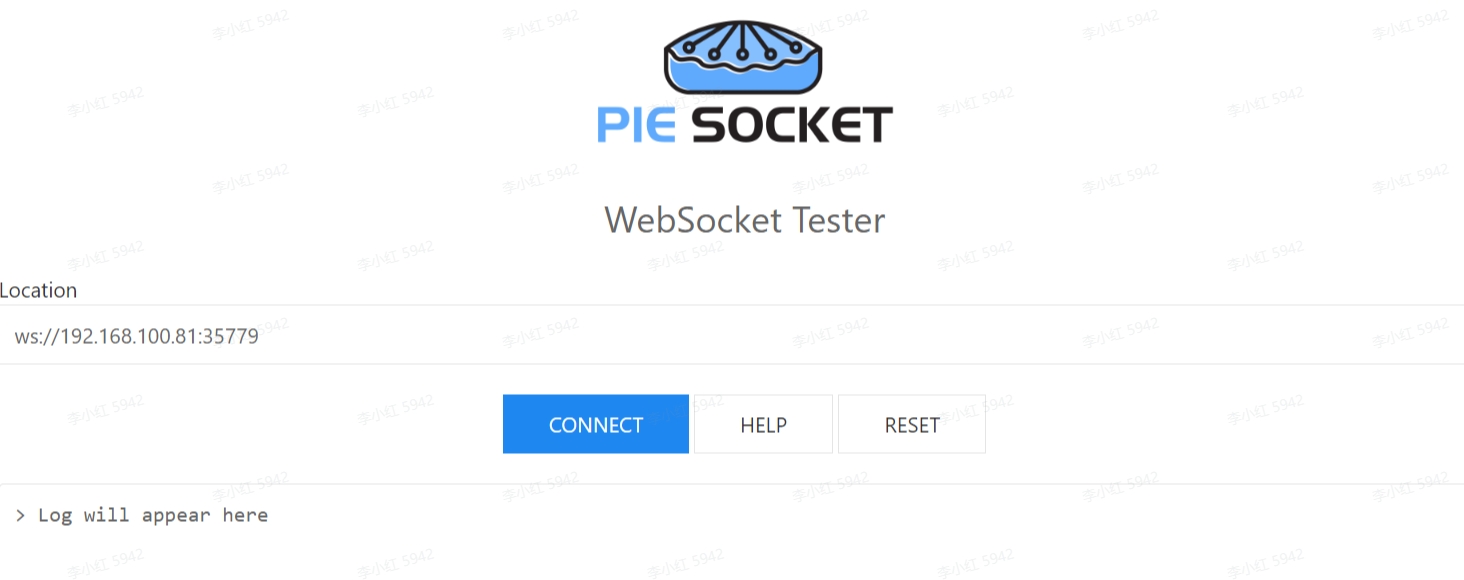
- When the connection is successful, enter the transaction message and click SEND MESSAGE.
Configure a connection
Set up a WebSocket connection between your POS and the CodePay terminal.
You can use the following code as an example to configure the connection.
1. Create client instance
import com.codepay.register.sdk.client.ECRHubClient
import com.codepay.register.sdk.client.ECRHubConfig

val config = ECRHubConfig()
mClient = ECRHubClient.getInstance()
mClient.init(config, this)
2. Initialize the connection
Initialize the connection to start communication with the CodePay terminal. You must do this before calling any other methods.
Also save the connection status. If the device is already connected, do not start the connection again.
// Connecting to the terminal
mClient.connect("ws://xxxxxx")
3. Disconnect
Disconnect your POS from the CodePay terminal.
// This will try disconnect from the terminal
mClient.disconnect();
Accept a payment
Build a sale payment request intent.
Example sale transaction request:
import com.codepay.register.sdk.client.payment.PaymentRequestParams
import com.codepay.register.sdk.client.payment.PaymentResponseParams
import com.codepay.register.sdk.listener.ECRHubResponseCallBack

// Build sale request intent
val params = PaymentRequestParams()
params.app_id = "{YOUR_PAYMENT_APP_ID}"
params.merchant_order_no = "{YOUR_POS_REF_ID}" // Should be unique for each request
params.order_amount = "1.1"
params.pay_scenario = "SWIPE_CARD" // Bank Card payment

// Initiate a sale transaction request
mClient.payment.sale(params, object :
  ECRHubResponseCallBack {
    override fun onError(errorCode: String?, errorMsg: String?) {
      // Error handling response
    }

    override fun onSuccess(data: PaymentResponseParams?) {
      // Check response for success and process accordingly
    }
  }
)
Refund a payment
Build an unreferenced refund payment request intent.
An unreferenced refund lets you send money back to any card that is tapped, dipped, or swiped on the CodePay terminal.
For example, you can refund a person who did not make the original purchase, like someone returning a gift.
Example unreferenced refund transaction request:
import com.codepay.register.sdk.client.payment.PaymentRequestParams
import com.codepay.register.sdk.client.payment.PaymentResponseParams
import com.codepay.register.sdk.listener.ECRHubResponseCallBack

// Build unreferenced refund request intent
val params = PaymentRequestParams()
params.app_id = "{YOUR_PAYMENT_APP_ID}"
params.merchant_order_no = "{YOUR_POS_REF_ID}" // Should be unique for each request
params.order_amount = "1.1"
params.pay_scenario = "SWIPE_CARD" // Bank Card payment

// Initiate a unreferenced refund transaction request
mClient.payment.refund(params, object :
  ECRHubResponseCallBack {
    override fun onError(errorCode: String?, errorMsg: String?) {
      // Error handling response
    }

    override fun onSuccess(data: PaymentResponseParams?) {
      // Check response for success and process accordingly
    }
  }
)
Build a referenced refund payment request intent.
A referenced refund is linked to the original payment using that orig_merchant_order_no.
If orig_merchant_order_no is provided, the refund must be processed as a referenced refund.
In this case, the card does not need to be tapped, dipped, or swiped on the CodePay terminal.
Example referenced refund transaction request:
import com.codepay.register.sdk.client.payment.PaymentRequestParams
import com.codepay.register.sdk.client.payment.PaymentResponseParams
import com.codepay.register.sdk.listener.ECRHubResponseCallBack

// Build referenced refund request intent
val params = PaymentRequestParams()
params.app_id = "{YOUR_PAYMENT_APP_ID}"
params.merchant_order_no = "{YOUR_POS_REF_ID}" // Should be unique for each request
params.orig_merchant_order_no = "{ORIGINAL_MERCHANT_ORDER_NO}" // The merchant order no from the original payment
params.order_amount = "1.1"
params.pay_scenario = "SWIPE_CARD" // Bank Card payment

// Initiate a referenced refund transaction request
mClient.payment.refund(params, object :
  ECRHubResponseCallBack {
    override fun onError(errorCode: String?, errorMsg: String?) {
      // Error handling response
    }

    override fun onSuccess(data: PaymentResponseParams?) {
      // Check response for success and process accordingly
    }
  }
)
For a better experience, you can use our Open API to perform refund a referenced payment transaction made on other terminals, instead of being limited to on the current terminal only.
Cancel (Void) a payment
You can cancel a payment any time while it is still in the batch.
Once the batch is closed, the payment can no longer be canceled.
Example cancel payment transaction request:.
import com.codepay.register.sdk.client.payment.PaymentRequestParams
import com.codepay.register.sdk.client.payment.PaymentResponseParams
import com.codepay.register.sdk.listener.ECRHubResponseCallBack

// Build void request intent
val params = PaymentRequestParams()
params.app_id = "{YOUR_PAYMENT_APP_ID}"
params.merchant_order_no = "{YOUR_POS_REF_ID}" // Should be unique for each request
params.orig_merchant_order_no = "{ORIGINAL_MERCHANT_ORDER_NO}" // The merchant order no from the original payment
params.order_amount = "1.1"
params.pay_scenario = "SWIPE_CARD" // Bank Card payment

// Initiate a void transaction request
mClient.payment.cancel(params, object :
  ECRHubResponseCallBack {
    override fun onError(errorCode: String?, errorMsg: String?) {
      // Error handling response
    }

    override fun onSuccess(data: PaymentResponseParams?) {
      // Check response for success and process accordingly
    }
  }
)
For a better experience, you can use our Open API to perform cancel a payment transaction made on other terminals, instead of being limited to on the current terminal only.
Retrieve a payment
Example retrieve payment transaction request:
import com.codepay.register.sdk.client.payment.PaymentRequestParams
import com.codepay.register.sdk.client.payment.PaymentResponseParams
import com.codepay.register.sdk.listener.ECRHubResponseCallBack

// Build query request intent
val params = PaymentRequestParams()
params.app_id = "{YOUR_PAYMENT_APP_ID}"
params.merchant_order_no = "{ORIGINAL_MERCHANT_ORDER_NO}" // The merchant order no from the original payment

// Initiate a query transaction request
mClient.payment.query(params, object :
  ECRHubResponseCallBack {
    override fun onError(errorCode: String?, errorMsg: String?) {
      // Error handling response
    }

    override fun onSuccess(data: PaymentResponseParams?) {
      // Check response for success and process accordingly
    }
  }
)
For a better experience, you can use our Open API to perform retrieve payment transaction made on other terminals, instead of being limited to on the current terminal only.
Adjust a tip
It lets the merchant add or adjust a tip to an existing payment.
For example, the merchant can enter a tip amount written on a receipt.
Example adjust a tip request:
import com.codepay.register.sdk.client.payment.PaymentRequestParams
import com.codepay.register.sdk.client.payment.PaymentResponseParams
import com.codepay.register.sdk.listener.ECRHubResponseCallBack

// Build tip adjust request intent
val params = PaymentRequestParams()
params.app_id = "{YOUR_PAYMENT_APP_ID}"
params.merchant_order_no = "{ORIGINAL_MERCHANT_ORDER_NO}" // The merchant order no from the original payment
params.tip_adjustment_amount = "1.1"

// Initiate a tip adjust transaction request
mClient.payment.tipAdjustment(params, object :
  ECRHubResponseCallBack {
    override fun onError(errorCode: String?, errorMsg: String?) {
      // Error handling response
    }

    override fun onSuccess(data: PaymentResponseParams?) {
      // Check response for success and process accordingly
    }
  }
)
For a better experience, you can use our Open API to perform a tip adjustment on payments made on other terminals, instead of being limited to on the current terminal only.
Batch close
It lets the merchant to manually closeout the current batch of transactions.
Example batch close request:
import com.codepay.register.sdk.client.payment.PaymentRequestParams
import com.codepay.register.sdk.client.payment.PaymentResponseParams
import com.codepay.register.sdk.listener.ECRHubResponseCallBack

// Build batch close request intent
val params = PaymentRequestParams()
params.app_id = "{YOUR_PAYMENT_APP_ID}"

// Initiate a batch close request
mClient.payment.batchClose(params, object :
  ECRHubResponseCallBack {
    override fun onError(errorCode: String?, errorMsg: String?) {
      // Error handling response
    }

    override fun onSuccess(data: PaymentResponseParams?) {
      // Check response for success and process accordingly
    }
  }
)
For a better experience, you can use our Open API to perform all-terminals batch close at once, instead of being limited to on the current terminal only.